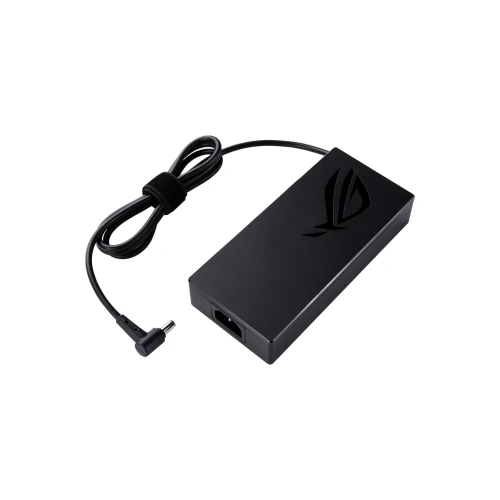
ASUS ROG AD240-00E 240W (DC 20.0V/12.0A) DC Adapter (Original)

N.B. Image may differ with actual product's layout, color, size & dimension. No claim will be accepted for image mismatch.

ASUS ROG AD240-00E 240W (DC 20.0V/12.0A) DC Adapter (Original)

Product Id: 04.05.0054

Regular Price  9,200
Special Price  8,999

Quick Overview

ASUS ROG AD240-00E 240W (DC 20.0V/12.0A) DC Adapter (Original)
Brand
ASUS
Model
AD240-00E
AC Input
100-240V ~ 50-60Hz 3.5A
DC Output
20.0V / 12.0A
Voltage
20.0V
Watt
240W
Operating Frequency
50 to 60 Hz
Compatible With
H5600QM, H5600QR, UX582HM, UX582HS, UX582LR, W7600H3A, W7600H5A, G513IH, G513RM, G713RM, GA401QC, GA402RJ, GA402RK, GA503RM, GA503RS, GA503RW, GU603ZM, GU603ZW, FX506HC, FX506HE, FX506HM, FX516PE, FX516PM, FX706HC, FX706HE, FX706HM, G513QC, G513QE, G513QM, G713QC, G713QE, G713QM, G713QR, GA401QC, GU603HM, UX582LR, FX505DT, GA502IV, G512LI, GA401IV, GA401IU, FA706IU, FA506II, FA506IU, FA706II, FX706LI, FX506LI, FX506LH, GA502IU, FA506IH, FX506LU, GA503QS, GX551QM, GA503QR, GA503QM, G513QR, G733QS, G733QR, GA401QE, GA401QEC, GA401QM, FA506QR, FA706QM, FA506QM, FX516PR, FA706QR, GU603HR, W700G2T, W700G1T, W730G2T, W730G1T, G531GT, GA502DU, G731GT, G531GD, FX705DT, GX550LWS, GX550LXS, GA401IVC, GA401II, GX701LXS, GX701LWS, FA706IH, FA506QE, G733QSA, GL531GT, GX502LWS, GX502LXS, GX701LV, TUF505DT, TUF506HE, TUF506IH, TUF506II, TUF506IU, TUF506LU, TUF506QE, TUF516PE, TUF516PR, TUF706IU, TUF706QE, H5600QE, H5600QM, H5600QR, H7600HM, UX325UA, UX582HM, UX582HS, UX582ZM, W5600Q2A, W7600H3A, W760
Color
Black
Ac Power Cable with Adapter
Yes
Product Condition
Brand New
Warranty
1 Year (365 Days)

Details

Brand - Asus, Model - AD240-00E, DC Connector Size - 6.0mm, AC Input - 100-240V ~ 50-60Hz 3.5A, Dc Output - 20.0V / 12.0A, Total Output - 240W, DC Cable Length - 120cm, Power Cord Length:180cm, Color - Black, Product Condition - Brand New & Original, Warranty - 1-Year Brand Warranty (365 Days)

⚡ Laptop Adapter Buying Guide

Laptop adapters are very important for safe and stable charging. A good adapter keeps your laptop protected and ensures smooth performance. Choosing the right adapter helps avoid charging issues and hardware damage.

🔍 When should you replace your laptop adapter?

  • Laptop is not charging properly
  • Charging stops and starts again
  • Adapter gets very hot quickly
  • Cable or pin is damaged or broken
  • Laptop shows “Plugged in, not charging” issue
  • Charging light flickers or doesn’t turn on

🛒 What to check before buying a new adapter

  • Model Compatibility: Make sure it matches your laptop model
  • Voltage & Wattage: Always match the original adapter’s V and W rating
  • Connector Type: Check the charging pin size carefully
  • Quality: Choose OEM or high-quality adapters for safety and durability
  • Warranty: Prefer adapters with warranty support

⚠️ Why choosing the right adapter is important

A wrong or low-quality adapter can damage your laptop motherboard, battery, and other internal parts.

🔌 Laptop Adapter Care Tips for Long-Lasting Use

  • Avoid bending or twisting the cable
  • Don’t pull the cable from the wire always unplug from the head
  • Keep the adapter in a cool and dry place
  • Avoid using it on unstable power sockets
  • Unplug when not in use for long time
  • Use a surge protector for extra safety
  • Don’t cover the adapter while charging (prevents overheating)

💡 Extra Tips

  • If your adapter heats up too much, stop using it and check immediately
  • Regularly check for cable damage or loose connection

Your review

Your Question