
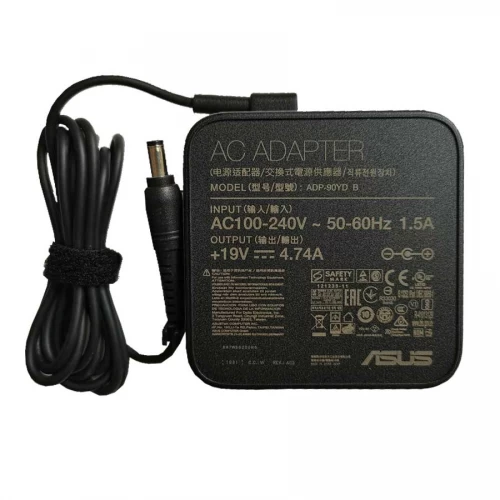
Asus S15 19V 4.74A 90W* (5.5x2.5mm) Laptop Adapter

N.B. Image may differ with actual product's layout, color, size & dimension. No claim will be accepted for image mismatch.

Asus S15 19V 4.74A 90W* (5.5x2.5mm) Laptop Adapter

Product Id: 04.05.0024

Regular Price  5,500
Special Price  5,000

Quick Overview

Asus S15 19V 4.74A 90W* (5.5x2.5mm) Laptop Adapter
Brand
Asus
Model
Asus S15 19V 4.74A
AC Input
100V – 240V~0.6A
DC Output
4.74A
Voltage
19V
Watt
90W
DC Cable Length
1.5 Meter
DC Connector Type
General port
DC Connector Size
5,50/2,50 mm
Operating Frequency
50 to 60 Hz
Compatible With
ASUS VivoBook 15 S532 FA S15 S532F S15 S532FA-BN024T S15 S532FA-DB55 S15 S532FL-EB71 S15 S532FL ASUS EeeBox s15 s532fl-bq214r S15 S532FL-DB77 Series
Color
Black
Ac Power Cable with Adapter
No
Product Condition
Brand New
Made in/ Assemble
China
Warranty
1 Year (365 Days)

Details

Brand - Asus, Model - Asus S15 19V 4.74A, DC Connector Size - 5,50/2,50 mm, Compatible With - Asus VivoBook S15 S532FL Series, Voltage - 19V, AC Input - 100V – 240V~0.6A, Dc Output - 4.74A, Operating Frequency - 50 to 60 Hz, DC Cable Length - 1.5 Meter, Color - Black, Product Condition - Brand New & Original, Made in/ Assemble - China, Warranty - 1 Year (365 days)

⚡ Laptop Adapter Buying Guide

Laptop adapters are very important for safe and stable charging. A good adapter keeps your laptop protected and ensures smooth performance. Choosing the right adapter helps avoid charging issues and hardware damage.

🔍 When should you replace your laptop adapter?

  • Laptop is not charging properly
  • Charging stops and starts again
  • Adapter gets very hot quickly
  • Cable or pin is damaged or broken
  • Laptop shows “Plugged in, not charging” issue
  • Charging light flickers or doesn’t turn on

🛒 What to check before buying a new adapter

  • Model Compatibility: Make sure it matches your laptop model
  • Voltage & Wattage: Always match the original adapter’s V and W rating
  • Connector Type: Check the charging pin size carefully
  • Quality: Choose OEM or high-quality adapters for safety and durability
  • Warranty: Prefer adapters with warranty support

⚠️ Why choosing the right adapter is important

A wrong or low-quality adapter can damage your laptop motherboard, battery, and other internal parts.

🔌 Laptop Adapter Care Tips for Long-Lasting Use

  • Avoid bending or twisting the cable
  • Don’t pull the cable from the wire always unplug from the head
  • Keep the adapter in a cool and dry place
  • Avoid using it on unstable power sockets
  • Unplug when not in use for long time
  • Use a surge protector for extra safety
  • Don’t cover the adapter while charging (prevents overheating)

💡 Extra Tips

  • If your adapter heats up too much, stop using it and check immediately
  • Regularly check for cable damage or loose connection

Your review

Your Question